Sidestep

Sidestep
for Safari

Websites load jQuery, React and Bootstrap from a handful of giant delivery networks, and every page tells those networks who you are. Sidestep serves the same files from your own device instead.

Download on the App Store Check my protection
Requires macOS 13 or iOS 17 or later · one purchase, every device
224
Libraries on your device
33
Networks covered
0
Data collected

Privacy that does not break the web

Sidestep replaces the requests, it does not block them. Pages behave exactly as before, the networks just never hear from you.

224 libraries, stored locally

jQuery, React, Vue, AngularJS, Bootstrap, Font Awesome, D3, Lodash, Moment.js, MathJax and hundreds more, kept on your device.

34 networks covered

Google Hosted Libraries, cdnjs, jsDelivr, jQuery CDN, Microsoft Ajax, the Bootstrap CDNs and every other major host.

The network is never contacted

No request leaves your device, so there is no IP address to log and no record of which page you were reading.

Tracking headers removed

For the rare library we do not carry, the referring page and cookies are stripped so the network still cannot tell where you came from.

Block Google Fonts

An optional switch that stops font requests reaching Google at all. Off by default, because it changes how some sites look.

Off for one site, in one tap

If a page really needs the original file, switch Sidestep off just for that site from the toolbar. Everywhere else stays protected.

See it working

A live test page asks twelve well-known libraries from four networks and tells you, one by one, whether each came from your device.

Mac, iPhone and iPad

One purchase covers every device on your Apple Account, with the same settings and the same protection.

Nothing to set up

No account, no rules to write, no maintenance. Install it, switch it on in Safari, and it works from the first page you open.
Small, quiet, and out of the way

Sidestep has one job and does it in the background. The interface exists so you can check on it and switch it off when you need to.

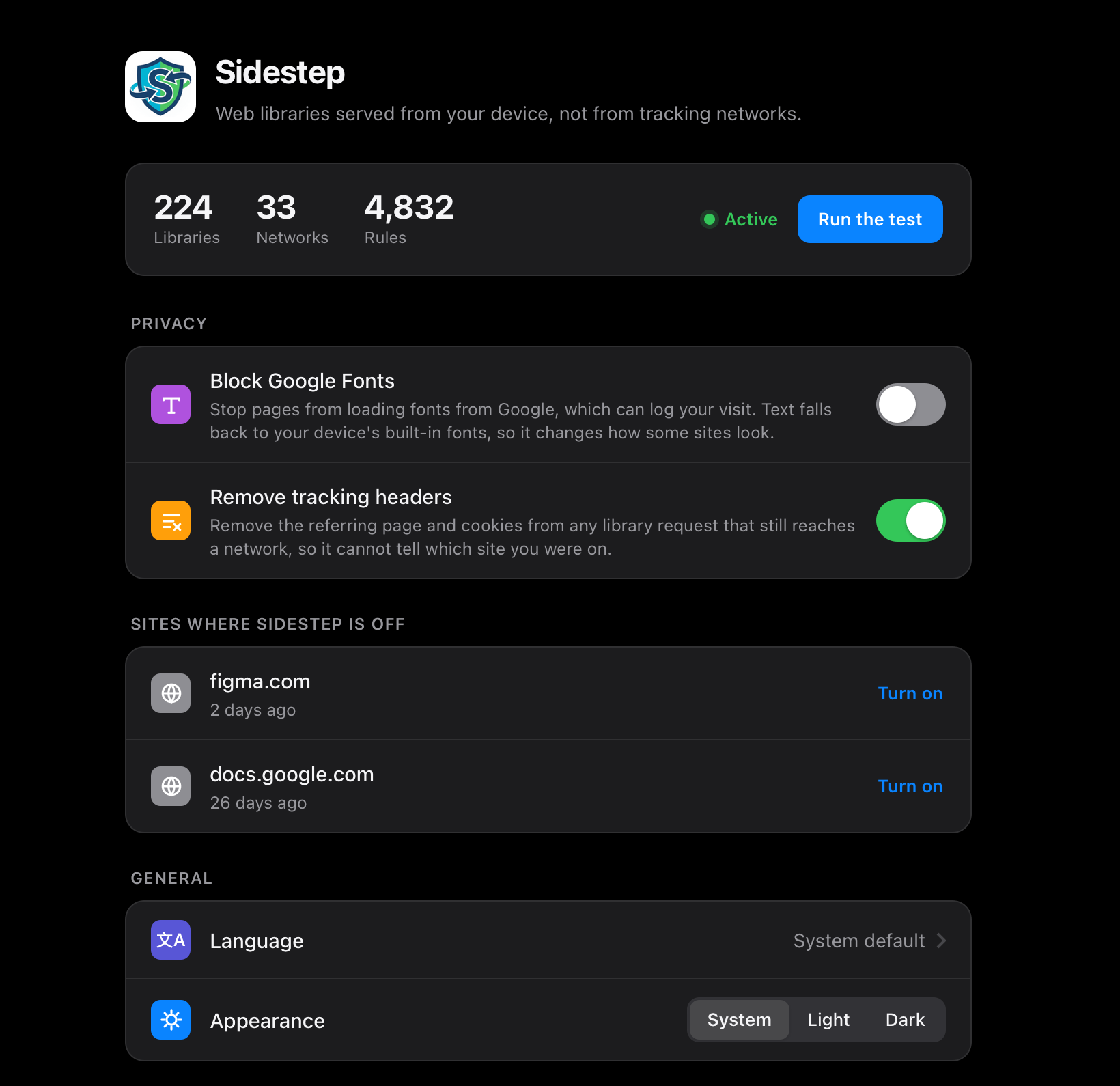
Sidestep settings: coverage, privacy switches, per-site exceptions, language and appearance
Settings: coverage, privacy options, language and appearance
The Sidestep toolbar popup showing the current site protected
One tap in the toolbar, for the site you are on

Up and running in a minute

1

Install from the App Store

One purchase covers Mac, iPhone and iPad.

2

Enable it in Safari

Safari Settings, then Extensions, then switch Sidestep on and allow it on every website.

3

Carry on browsing

That is it. Open the test page any time you want to confirm it is doing its job.

Your ad blocker does not do this

Content blockers leave these requests alone, deliberately

Blocking a page's jQuery would break the page, so blockers let the request through. The delivery network answers it, and in doing so learns your IP address and which site you were on. It happens on an enormous share of the web, and no list will stop it without collateral damage.

Sidestep takes the other route. It answers the request itself, from a copy already on your device, so the page gets exactly the file it asked for and the network gets nothing. Nothing breaks, and nothing leaks.

It runs alongside your blocker, not instead of it.

The full list

224 libraries bundled on device
33 content delivery networks covered
Exact-version matching, never a substitute build
Byte-identical files, so integrity checks still pass
Referrer and cookies stripped from fallback requests
Optional Google Fonts blocking
Per-site off switch from the toolbar
Live protection test page
33 languages, with an in-app picker
Light, dark, or follow the system
Universal: Mac, iPhone and iPad
No account, no analytics, no telemetry
Makes no network requests of its own
Built on open-source LocalCDN and Decentraleyes

What has changed

Release history
v1.0
  • First release
  • 224 libraries served from your device across 34 delivery networks
  • Referrer and cookies stripped from any request that still reaches a network
  • Optional Google Fonts blocking
  • Per-site off switch, language picker and appearance setting
  • Live protection test page

Reasonable things to ask

Will this break websites?

It should not. Sidestep hands the page exactly the file it asked for, byte for byte, so even sites that verify a library's contents keep working. If a page ever misbehaves, switch Sidestep off for that one site from the toolbar and carry on.

Do I still need an ad blocker?

Yes. They solve different problems and work well together. Blockers stop adverts and trackers; they deliberately leave shared code libraries alone because blocking those breaks pages. Sidestep is what handles that remaining category.

Does Sidestep see my browsing?

No. It makes no network requests of its own and has no server to send anything to. The only thing it stores is your own settings, on your device.

What happens to a library you do not carry?

The request goes through to the network as normal, so the page still works. Sidestep strips the referring page and cookies from it first, so the network learns as little as possible.

How do I know it is actually working?

Open the protection test. It requests twelve well-known libraries from four different networks and reports, for each one, whether it came from your device or from the network.