 Night Crow For Safari
Dark theme for every website
Night Crow For Safari
A smart, native dark mode for every website in Safari. Dynamic color remapping that keeps photos true and text readable, with per-site rules, presets, and sunset-to-sunrise scheduling.
For macOS, iOS, and iPadOS
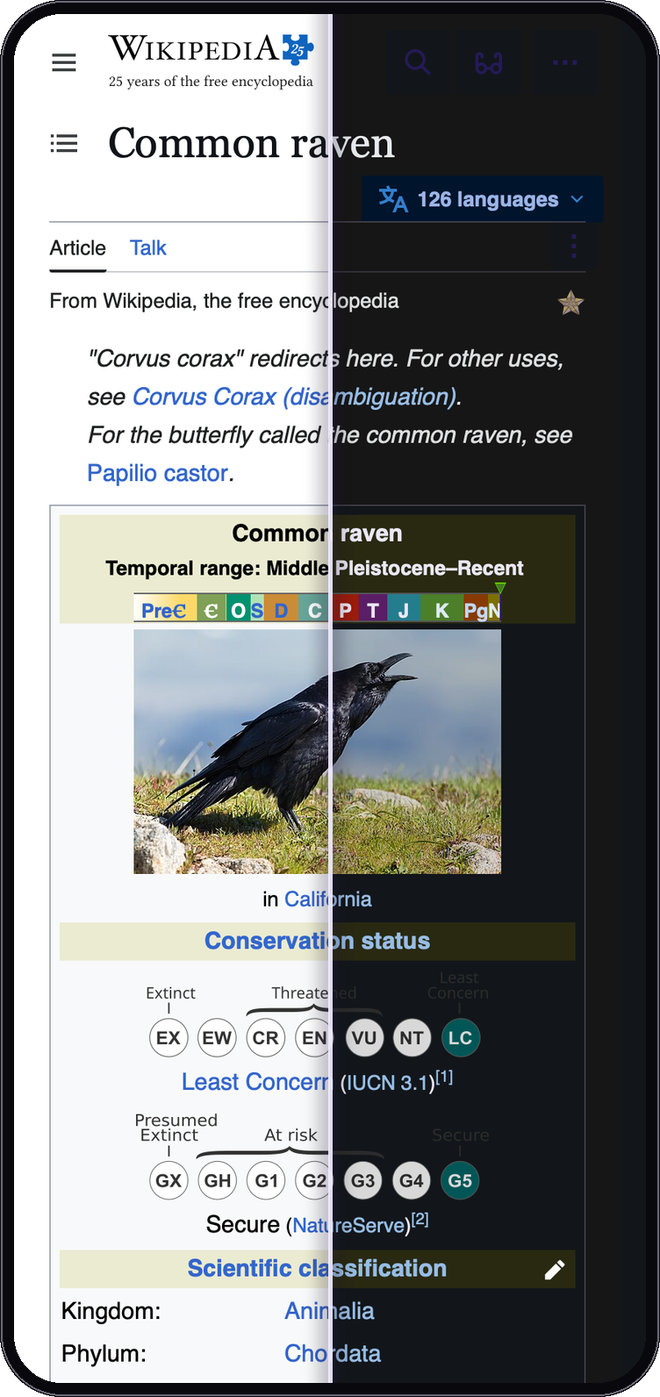
Darkness, done properly
Dynamic mode
Reads each site's own colors and rebuilds them dark. Photos stay true, text stays readable.
Four theming modes
Dynamic, Filter, Filter+ and Static. Pick a different one per site whenever it fits better.
Per-site rules
Enable, disable or fine-tune any site, down to a single section like example.com/docs.
Smart scheduling
Follow your system appearance, a time window, or sunset to sunrise at your location.
Theme presets
Dim, Midnight, Slate, Sepia night and High contrast. One click each.
Custom CSS & fonts
Inject your own CSS per site, override page fonts, and sharpen text with a stroke.
Already-dark aware
Sites that ship their own dark theme are detected and left alone, no double-darkening.
Private by design
No account, no analytics, no tracking. Nothing about your browsing ever leaves your device.
Fine-tune sliders
Brightness, contrast, sepia, and grayscale, globally or per site, right from the toolbar popup.
Smart logo handling
Dark logos and icons are analyzed pixel-by-pixel and inverted only when it helps, so photos are never touched.
Keyboard shortcut
Toggle Night Crow on any page with one keystroke. Rebindable in Safari's extension shortcut settings.
Backup & restore
Export all your settings to a file and import them on another Mac, or after a reinstall.
Readable forms everywhere
Inputs, dropdowns, scrollbars, and even autofilled fields follow the theme instead of flashing white or yellow.
Built for the modern web
Themes embedded frames and web components too, the parts of modern sites most dark-mode tools miss.
Accessibility-aware
Respects Increase Contrast and forced-colors settings, and holds remapped text to a perceptual contrast floor.
33 languages
Fully localized in English, Spanish, French, German, Japanese, Korean, Chinese, Arabic, and 25 more.
Up and running in seconds
Install from the App Store
Download Night Crow. It is a lightweight, native Safari extension.
Enable in Safari
Open Safari Settings, go to Extensions, turn on Night Crow, and allow it on websites.
Browse in the dark
Every site goes dark automatically. Tune any page right from the toolbar popup.
Built for Safari users
Photos stay beautiful
Dynamic mode rebuilds colors instead of inverting the whole page, so images and video keep their real colors.
Readable, always
A perceptual contrast floor keeps remapped text legible on every site, even where authors cut corners.
Speaks your language
Fully localized into 33 languages: the popup, the settings, the onboarding, and this page.
Pay once
Yours forever for the price of a coffee sip. No subscription, no ads, no upsells.
More from CorvusDevs
Privacy-first apps for macOS, iOS, and Safari.